
Product
Everything the office does, on one record.
From the rate confirmation to the driver's statement: one load, one record, nothing typed twice.
Rate confirmations
Read for you. Checked by you.
- Upload the PDF: the broker, the rate, every stop with its window and PO, pickup and BOL numbers, the miles and the detention terms are read for you.
- The rate confirmation sits next to the form, so you check each field against the document before you confirm.
- The driver and truck named on it are picked when they match yours, and the route shows on the map.
AI PROPOSES · YOU CONFIRM
On the board
Dispatch, with every stop
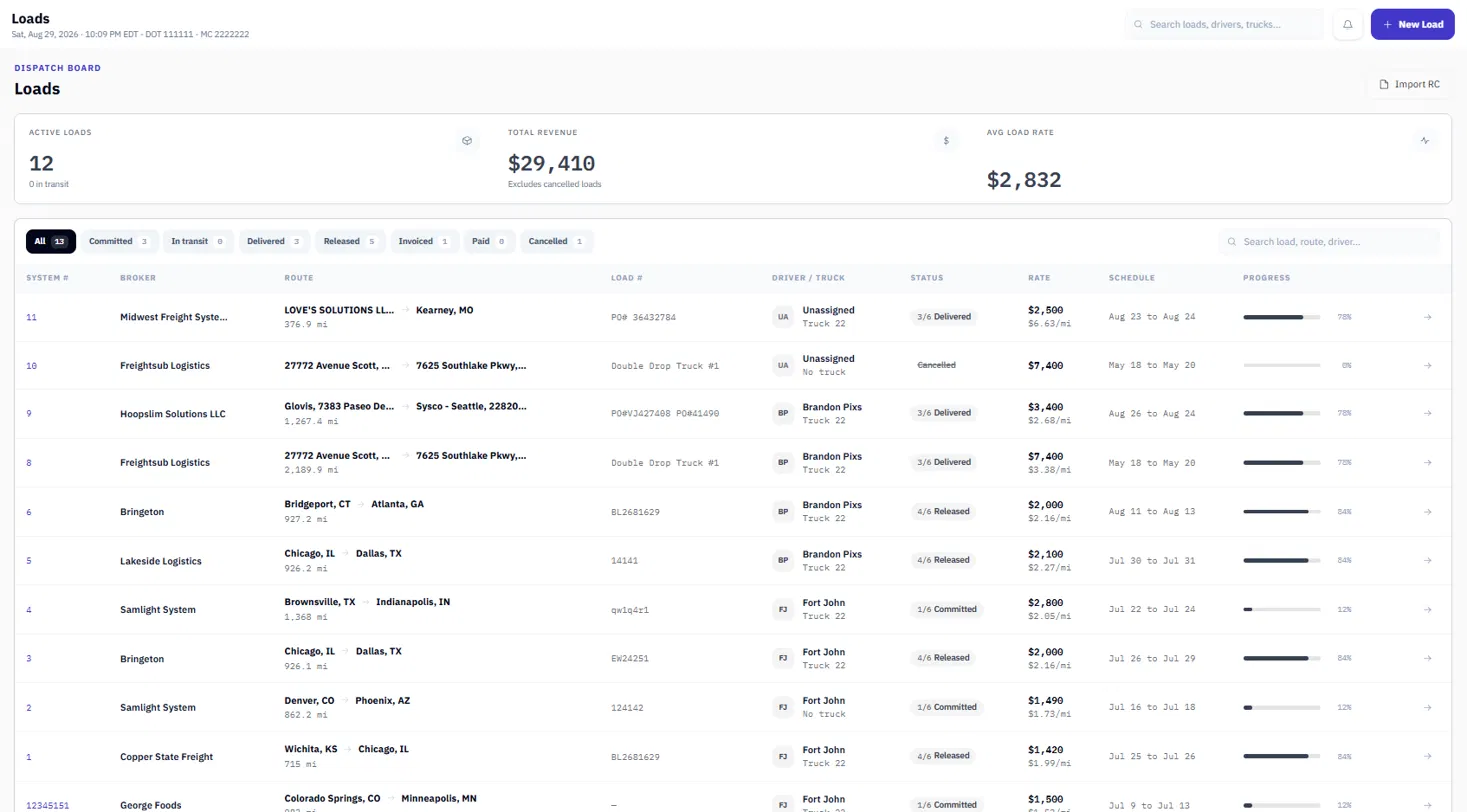
- Loads, drivers and trucks on one board, from booked to delivered.
- As many stops as the load has, each in its own time zone, with Arrived and Departed times.
- The route map shows while you fill in the load and goes through every stop; on the load, drag the route and save the miles.
- Search finds a load by any of its stops.
BOOKED · IN TRANSIT · DELIVERED
Partials
Several loads, one truck, one trip
- Put loads that ride together on one trip and set the order of all their stops.
- Join two loads' pickups or deliveries into one stop when they are the same place and time.
- The driver is paid for the trip's miles once, and you see the trip's revenue per mile.
TRIP · 2 LOADS · SHARED MILES PAID ONCE
Detention
From the first notice to the driver's pay
- Set your terms once: rate, free time, how time is billed, when the clock starts, a cap per stop.
- Notify the broker on arrival and when free time runs out; send the claim as a PDF with the times and the proof of delivery.
- Record what the broker approves, bill it on the invoice, and pay the driver for the wait.
ARRIVED · FREE TIME · CLAIM · APPROVED
Getting paid
Invoicing
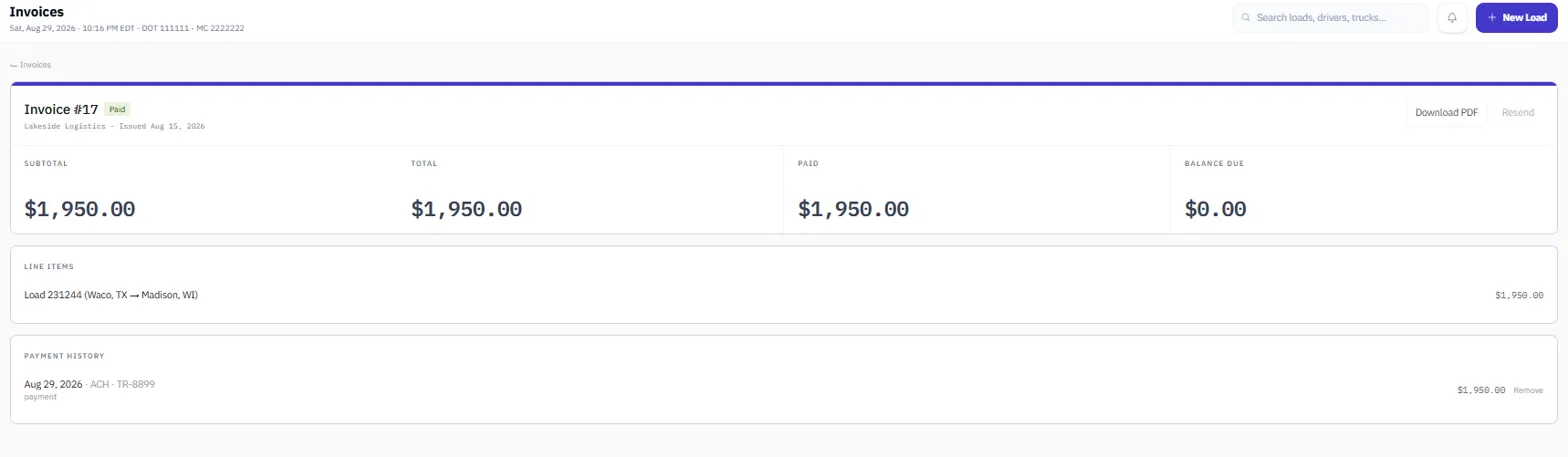
- An invoice goes out only with its rate confirmation and proof of delivery, and with your company details complete.
- Stop-offs and approved detention are their own lines; replies reach your company email.
- Track what's unbilled, sent and unpaid, and which brokers take longest to pay.
UNBILLED · SENT · UNPAID
Driver pay
Settlements
- Built from delivered loads: per mile, percentage or flat, with stop pay, detention, team splits and trips.
- Every line shows how it was worked out, and the rate it was paid at never changes afterwards.
- The statement goes to the driver as a PDF; percentage drivers see what each load was billed.
PER MILE · PERCENTAGE · FLAT · TEAM

Paperwork
Documents & compliance
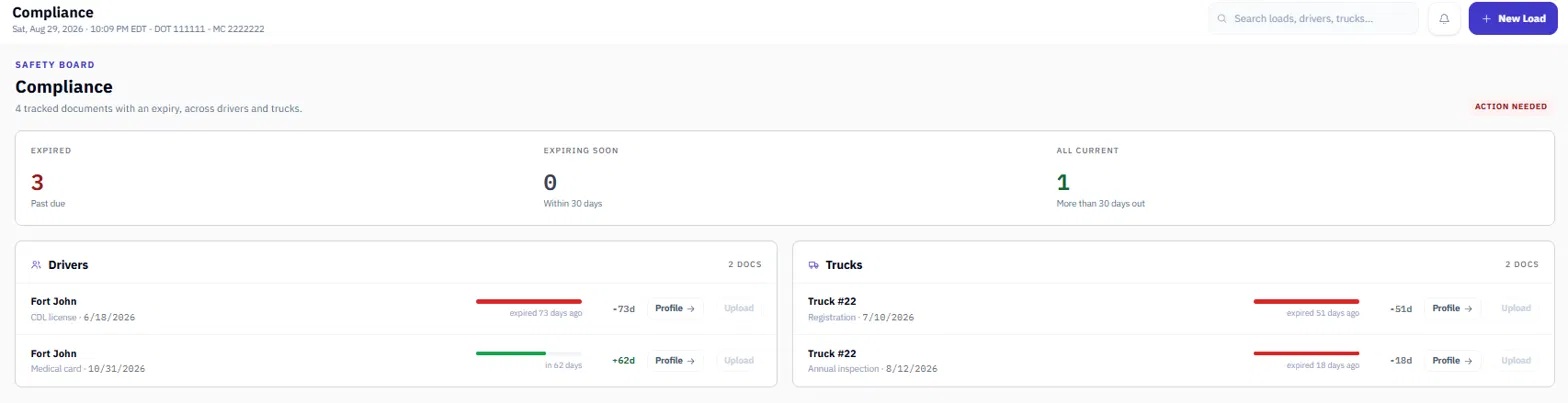
- Your authority, BOC-3, W-9, insurance, MCS-150, UCR, Form 2290 and other filings, with deadlines worked out from the rules.
- Each driver's qualification file: what's required, what's missing, what's due next. Sensitive documents open only for the owner and safety.
- Documents are archived, not deleted, and kept as long as the rules say. Send a broker your carrier packet in one email, without bank details.
DUE IN 108 DAYS · ON FILE · NOT ON FILE
Teams and history
Two drivers, one load. Every change on record.
- Put a co-driver on the load with each driver's share; each is paid their own rate on their share.
- Every change is logged in plain words: who, what and when. Sensitive details are masked, and nothing in the log can be edited.
DRIVER 60% · CO-DRIVER 40%
Moving in
Bring your history with you
- Import your brokers, drivers, trucks and loads from a CSV or Excel export; importing the same file again doesn't duplicate anything.
- Or send us your export: migration is free and we do the work.
CSV · XLSX
Access
Everyone works on the same records. Not everyone sees the same things.
Your dispatcher, your bookkeeper and whoever keeps the driver files are looking at one set of records, not three spreadsheets that disagree. What each of them can open, and what they can change, comes from the role you give them.
Owner
Everything, plus the things nobody else touches: company settings, the subscription, and who gets an account.
Dispatcher
Books loads and moves them from booked to delivered. Keeps drivers, trucks and brokers current. Files the rate con and the POD against the load.
Doesn't reach invoicing, settlements or receivables.
Accountant
Invoices delivered loads and tracks what's unpaid. Prepares driver settlements for the owner to finalize. Keeps broker records and can read the activity log. Reads loads, drivers and trucks without changing them.
Doesn't book or edit loads.
Safety manager
Drivers, trucks, documents and expiry dates. Reads the board without touching it.
Doesn't reach invoicing, settlements or receivables.
Roles are a starting point, not a cage.
Hardware
We don't sell hardware.
Keep the ELD provider you already have. Nothing changes in the truck. Eden One is the record your office runs on.
Contact
Talk to a person.
Telegram is fastest. Ask what you need to know before you move your carrier onto something new.
Telegram
You'll be talking to the Eden One team, who handle setup and migration.